

A Guide to Virtual Power with the HUAWEI WATCH GT 6 Pro

Copy Link


Written by Andreas Seewald
A Guide to Virtual Power with the
HUAWEI WATCH GT 6 Pro
Published on 05/11/2025 · 13:30

Copy Link


Written by Andreas Seewald
A Guide to Virtual Power with the HUAWEI WATCH GT 6 Pro

As a professional mountain bike marathon and gravel racer, I’ve learned that performance isn’t just about pushing hard, it’s about understanding how and when to push. Over the past few years, I’ve been fortunate enough to win numerous national and international championships, which have helped me reach the pinnacle of the global mountain bike and gravel world. The key always was and will always be a consistent routine of training and recovery which means record and analysing all corresponding data.

About the Author
In this article
01. How I Train and Why Data Matters
02. FTP, Power, and How Virtual Power Fits In
03. How I Use the Watch for Training
04. A Real Training Day with HUAWEI’s Virtual Power Meter
05. Final Thoughts
How I Train and Why Data Matters
I work closely with my coach, who builds my training plan down to the smallest detail. Every
session has a purpose, sometimes it’s about power and threshold, other days it’s about recovery
or endurance. I use data to keep training honest and balanced. Heart rate, HRV, training load
and power give me a clear picture of how hard to go and when to back off. It is not about
chasing numbers, it is about using them to build steady progress week after week. Power meters
stay my anchor because 250 watts is 250 watts, no matter the wind or heat.
But over the past weeks, I’ve been training at home on my familiar climbs, testing the HUAWEI
WATCH GT 6 Pro and its Virtual Power feature. And honestly, the results were much better
than I
expected.

FTP, Power, and How Virtual Power Fits In
For anyone training with structure, FTP (Functional Threshold Power) is key. It’s basically the
highest average power you can hold for an hour. My own FTP sits around 400 watts, and it’s the
foundation of almost everything I do, from base rides to interval sessions and race pacing. You
need a dedicated power meter, either built into the pedals or the crank, to calculate power
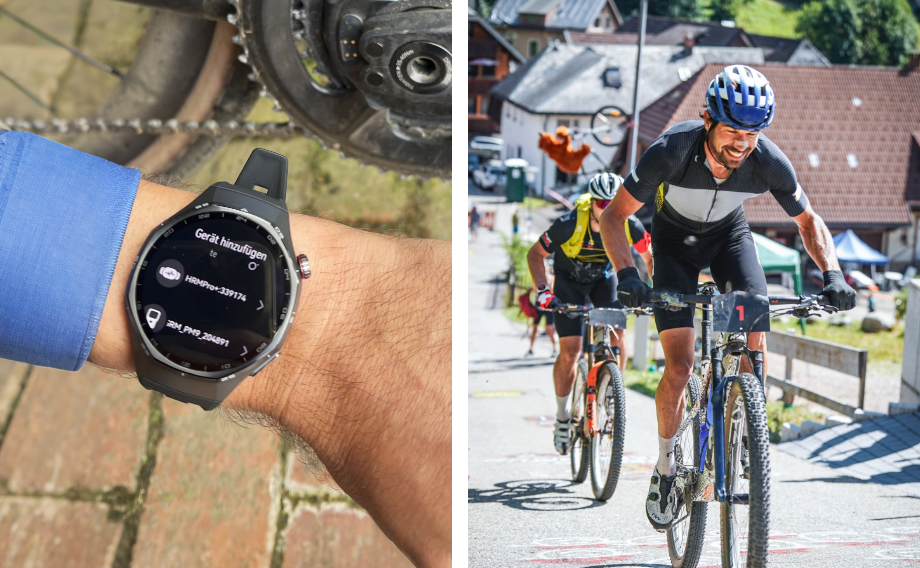
accurately. I connected mine to the HUAWEI
WATCH GT 6 Pro via Bluetooth and after a few rides I
had my first reliable FTP numbers.
For riders without a power meter, the HUAWEI WATCH GT 6 Pro can still estimate power using
HUAWEI’s Virtual
Power algorithm, which combines speed, gradient and GPS data. It gives a good overall sense of
effort, but it does not generate an FTP value, only real-time estimated average power throughout
each ride. When I compared it with my power meter over several rides, the accuracy was
surprisingly good on average. For sure close enough to make it genuinely useful for day-to-day
training. Of course, simulated power can only be accurate when conditions are stable. On a calm,
steady climb it works great, but strong wind or rapid gradient changes can throw it off. Still,
for structured training it’s incredibly helpful.
Accurate GPS and Heart Rate
for Advanced Sports
Up to 21-Day Battery Life
no more battery anxiety for outdoor sports
Pro-level Cycling Tracking with Virtual Cycling Power
Sapphire Glass Titanium Alloy
The watch automatically learns your performance profile and, when connected to a power meter, it
continuously refines your FTP estimate over time.
So no, it’s not a replacement for a real power meter. But it’s a smart, affordable, and
practical alternative that gives you a much clearer understanding of your effort, something most
cyclists never get from heart rate alone, and exactly the kind of insight other smartwatches
usually don’t offer.

“On my home climbs, which I use for power tests, the HUAWEI WATCH GT 6 Pro’s Virtual Power was very close to my real power meter. That’s impressive accuracy for a smartwatch.”
How I Use the Watch for Training
The thing I like most about the HUAWEI
WATCH GT 6 Pro is how it fits into my training routine.
It’s
always with me and the automatic start and stop of the training, is especially comfy. Even the
type of training is detected automatically.
During two alpine training rides (left: 110 km ride with power meter / right: an
80 km ride
using virtual power) a clear pattern emerges. The spread of values (min/max) is noticeably
larger with virtual power, since factors like wind, road surface, and gradient can distort the
estimation. However, when zooming into the 150–300 W range, both data sets align surprisingly
well.
It tracks the data I care about: heart rate, load, recovery, and now virtual power, and makes it
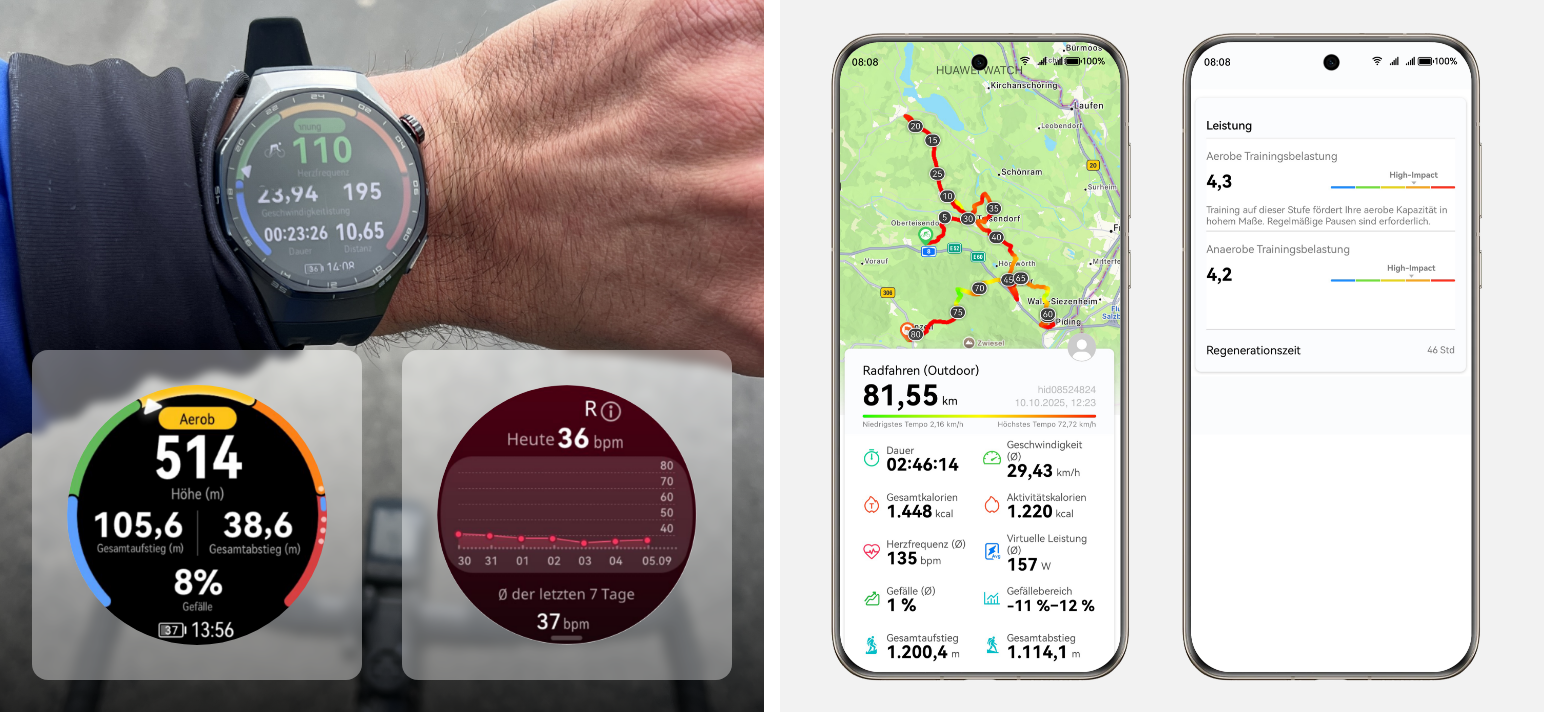
easy to understand afterward. In the HUAWEI Health App each ride appears with distance,
duration, map, and key averages. The recovery tab suggests how long to rest and shows how the
session fits into my weekly load.
My coach and I use it to double-check recovery days and longer aerobic sessions. It’s a great
backup for when I don’t have the bike computer or power pedals mounted, but still want reliable
effort data.
The watch automatically gives you heartrate zones, recovery recommendations, and intensity
balance. That kind of feedback is valuable even for experienced riders, and for hobby cyclists,
it’s gold. It’s like having a mini training lab on your wrist.
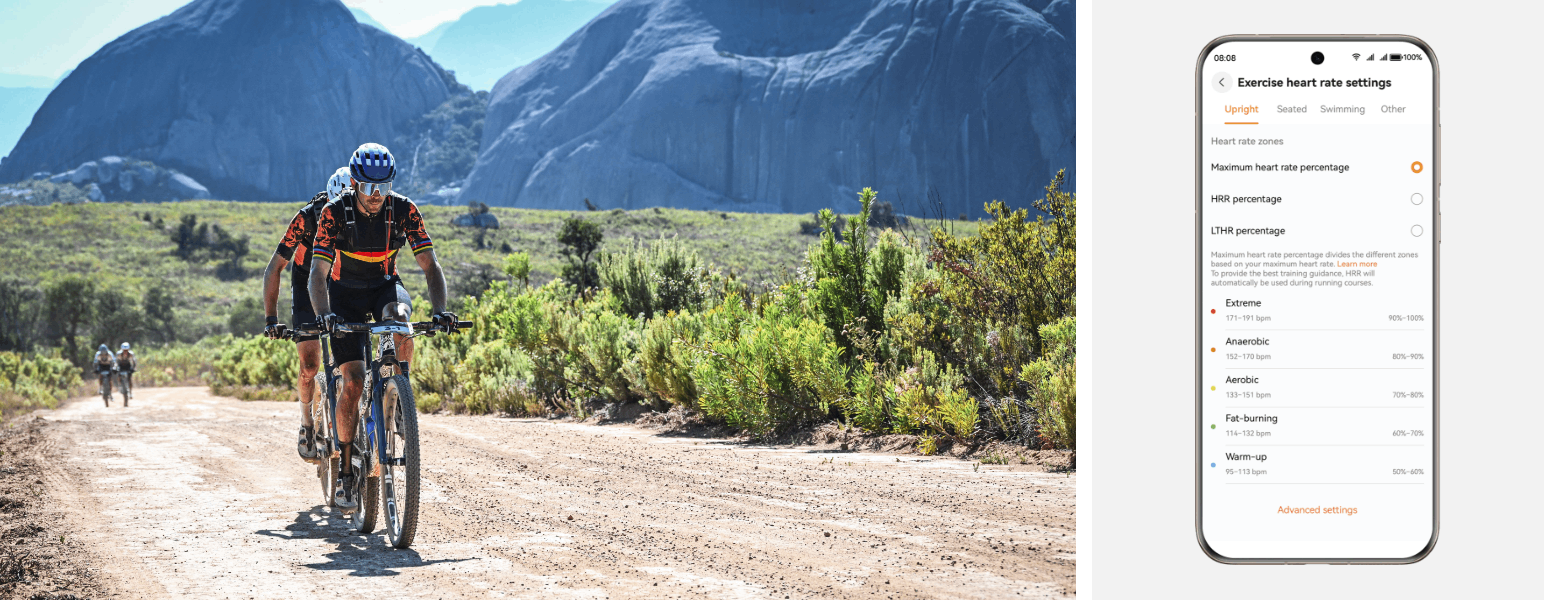
Huawei divides your training intensity into five heart rate zones, each reflecting a different
effort level and energy source. These are the default settings in the Huawei Health app, but
they can be customized based on your personal fitness and goals. These Workout Zone
ranges are
based on maximum heart rate (HRmax). For the most accurate feedback, you can adjust your HRmax
or use HRR or LTHR methods in the app’s advanced settings.
Good to know
Each Workout Zone targets a different training effect, helping you control intensity
and
make every workout more effective.
Warm-up (50–60%): Gentle activity that prepares the body for training and increases
circulation.
Fat-burning (60–70%): Moderate aerobic work where fat is the main fuel source, ideal
for
endurance building.
Aerobic (70–80%): Improves cardiovascular fitness and stamina; sustainable for longer
workouts.
Anaerobic (80–90%): Higher intensity that boosts speed and power; glycogen becomes
the main
fuel.
Extreme (90–100%): Maximum effort for short bursts, used for interval or sprint
training.
The HUAWEI WATCH GT 6 Pro makes structured, data-based training available to everyone. It’s simple, reliable, and a great tool to really understand your performance.
A Real Training Day with HUAWEI’s Virtual Power Meter
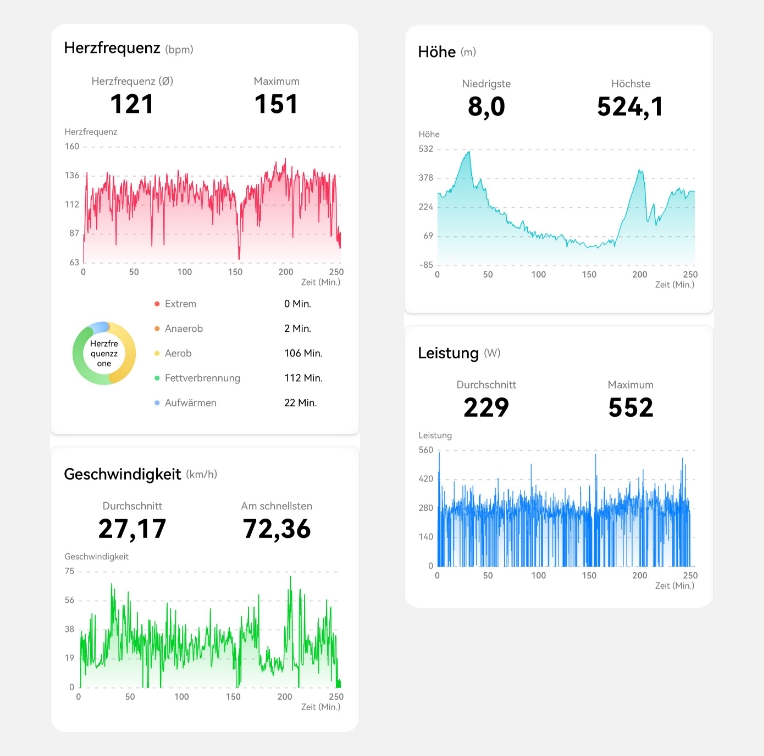
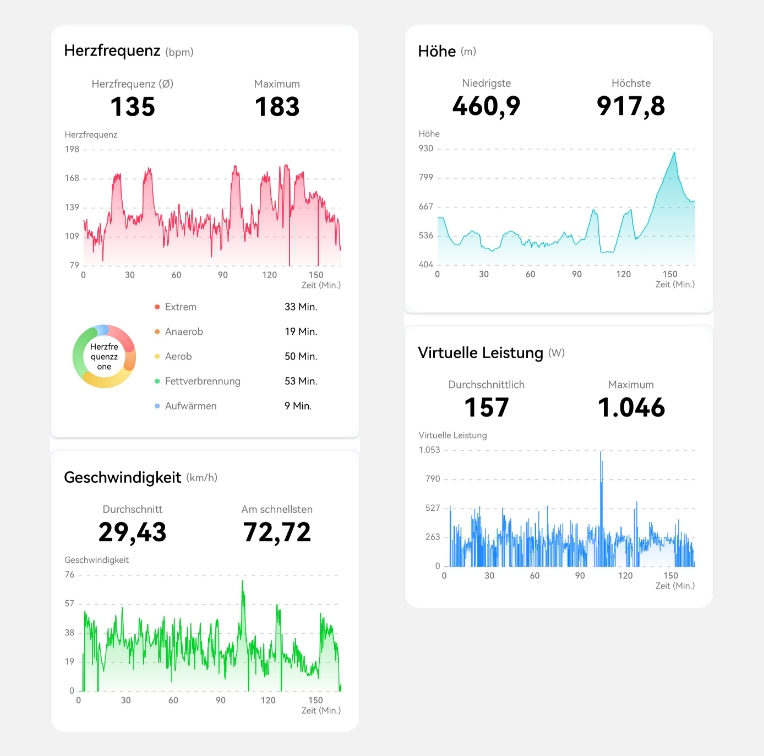
Here’s an example from one of my rides last week: a 81.55 km session with 1200m meters of
climbing, lasting 2 hours and 46 minutes.
On rolling terrain, the virtual power tracked my effort reasonably well, though its accuracy
changed a little with gradient, surface, and riding style. On smooth tarmac with a steady
cadence it matched my feel and the readings from a mounted power meter very closely, while on
rougher roads or when a short tailwind or a bit of drafting crept in, the estimate drifted. That
makes sense, since the algorithm uses speed, gradient, and GPS, and each of these can fluctuate
quickly while the calculation needs a moment to settle.
By comparing segments afterward, I could see where I rode more efficiently and where I lost
energy. For example, holding speed with a lower heart rate on firm surfaces, then paying for it
on loose gravel or into a gust. The session itself tells the story: average speed was 30.0 km/h,
average heart rate 135 bpm, and maximum 183 bpm. Average virtual power was 157 watts, peaking at
1046 watts on the steeper ramps. Seated climbs with smooth cadence produced stable readings,
while short standing surges spiked the curve. Stops and coasting were filtered well, which kept
the averages clean.
It is probably not the right tool for strict interval work where I need a precise target, but for longer rides or regular training days it is more than fine. Taken as a whole, virtual power gave me a clear picture of where the bike moved fast for the effort and where it did not, which is useful when planning future sessions with real power data.
Final Thoughts
For me, the HUAWEI
WATCH GT 6 Pro is a great training companion. During my test ride it handled
everything from smooth tarmac to rougher climbs without a problem, giving me clear data to
review afterward. I won’t stop using my power meter for racing or structured intervals, but for
daily sessions, base rides, or travel, this watch covers everything I need.
For anyone who doesn’t want to spend a fortune on cycling tech but still wants real performance
data, it’s the perfect balance between accuracy, simplicity, and accessibility. Train on your
familiar routes, stay consistent, and the Virtual Power data will show exactly how your body is
responding. That’s what smart training is about.

The author of this article is Andreas Seewald. The views expressed are his own.
The information is to be used as general information only, and is not to be taken as advice with
respect to any individual situation and cannot be relied upon as such. A healthcare provider should
be consulted when attempting to diagnose a condition or when determining the best course of action
for any health-related concern.
Users should exercise in a safe and suitable manner which is commensurate to their own exercise
capabilities and limits.
The heart rate and heart rate variability features are not a medical device, and therefore its
monitoring data and results are for reference only and should not be used as a basis for medical
diagnosis or treatment.
Read more
Explore


Copied