

How to set up a watch
Perform initial configuration
After purchasing a HUAWEI WATCH, follow these steps to power it on, connect it to your phone, and activate your dedicated smart assistant on your wrist to unlock more features.

Before use
Please turn on Bluetooth on your phone and make sure your phone is connected to WLAN or has mobile
data enabled.
Swipe down from the middle of the home screen to bring up the search box, enter Health & Fitness, and tap to open the HUAWEI Health
App.
If the app is not found, you can download the latest version of the Health App.
1. Turn on the HUAWEI WATCH.
Press and hold the up button on the watch until the HUAWEI logo lights up, and the watch will then power on normally.
* Before waking up a new device, connecting the watch to the original charging equipment and charging it will also automatically power on the watch.

2. Select Watch Language
Choose the language of the watch according to your usage preferences.

3. Scan to Pair
Swipe up on the watch screen to enter the scan and pair interface; on your
phone, open the HUAWEI Health App, go to the device
page, and tap.  > Scan the QR code on the watch screen using your phone.
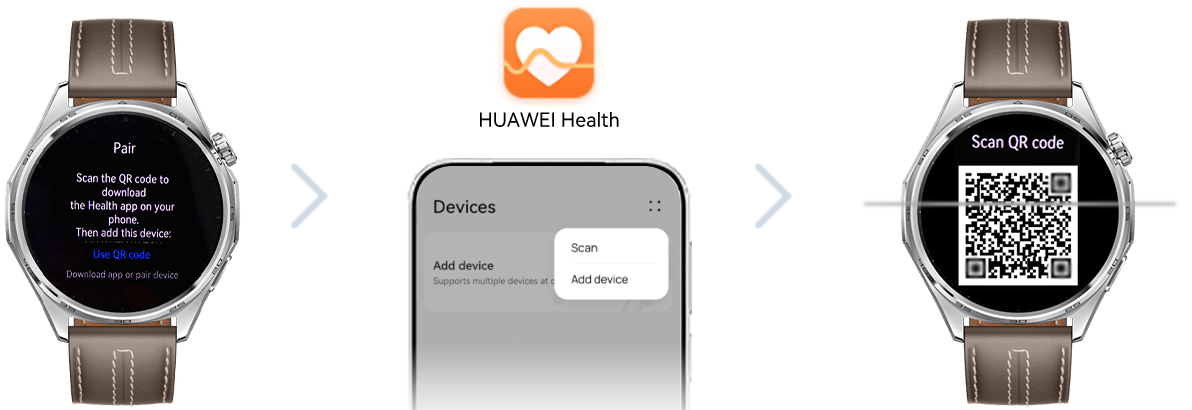
4. Sync Bluetooth messages
After the scan is successful, click "Connect". Once the phone synchronizes the device information, enter the Bluetooth message synchronization service interface, click "Agree", and start pairing.

5. Confirm pairing on the watch end
When a pairing request appears on the watch screen  , tap. Confirm pairing.

6. Confirm pairing on the mobile device
After confirming the pairing on the watch, a request for phonebook permissions will pop up on the phone interface. You can choose"Yes"or"No"according to your preference; then tap"Done"to pair the watch with your phone.
* On this interface, you can also check the options for automatically downloading update packages and installing them via WLAN.
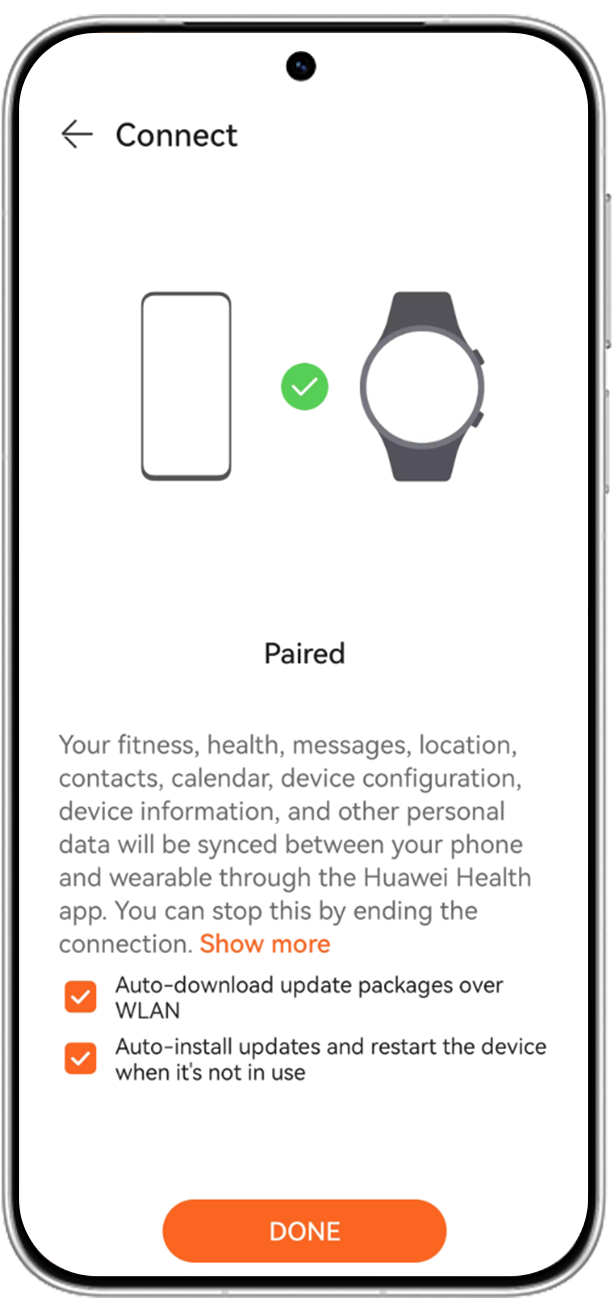
After connecting your phone and watch, you can access more comprehensive fitness guidance in the HUAWEI Health App. You can track basic health data such as heart rate, sleep, blood oxygen, and stress levels, develop healthier lifestyle habits, and enjoy more practical features like raising your wrist to wake the screen, conveniently answering calls, and replying to messages.
* Support varies by device; please refer to actual conditions for details.

Complete the watch setup to let your HUAWEI WATCH accompany you on more exciting adventures.
