Huawei Global | Smartphones,Laptops,Tablets,Watches and Smart Home

HUAWEI WATCH ULTIMATE DESIGN Spring Edition
Watch the video

"The world's very first wristwatches were made for women. My design draws inspiration from spring's awakening and the vivid brilliance of nature's rebirth—where the divine geometry of the Fibonacci sequence yields to the whisper of curves, moving in quiet rhythm with the wrist. More than a watch, it is a symbol of vibrant life blooming at the wrist."

——

Francesca Amfitheatrof

Internationally renowned jewellery designer

The designer of HUAWEI WATCH ULTIMATE DESIGN Spring Edition Francesca Amfitheatrof introduces the design philosophy
Timeless Beauty

Bloom in
Every Moment

Watch the video

Spring's first light is captured in
diamond and form—a living
composition on the wrist, where grace, serenity, and cutting-edge technology harmonise in perfect balance.

The picture of Liu Wen wearing HUAWEI WATCH ULTIMATE DESIGN Spring Edition shows its elegant charm

Diamond-cut
sapphire crystal.1

60 facets of light dance along its outer edge in harmony with time. Here, brilliance is not chased, but born.

The overview of HUAWEI WATCH ULTIMATE DESIGN Spring Edition sapphire glass bezel
The close-up of HUAWEI WATCH ULTIMATE DESIGN Spring Edition diamond-cut sapphire glass bezel

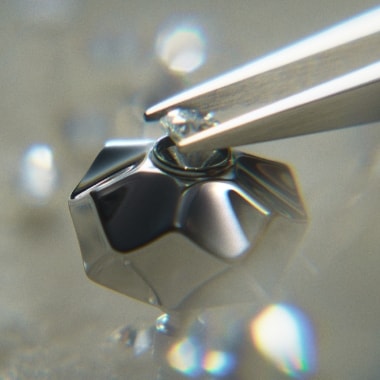
Diamond-set crown18 precisely cut facets on the metal crown trace a petal's curve, cradling a natural diamond at its heart. As you rotate the crown, the response is fluid, intuitive, and smooth.

The close-up of HUAWEI WATCH ULTIMATE DESIGN Spring Edition crown
The close-up of HUAWEI WATCH ULTIMATE DESIGN Spring Edition diamond inlay process

Diamond-set vine
motif strap.
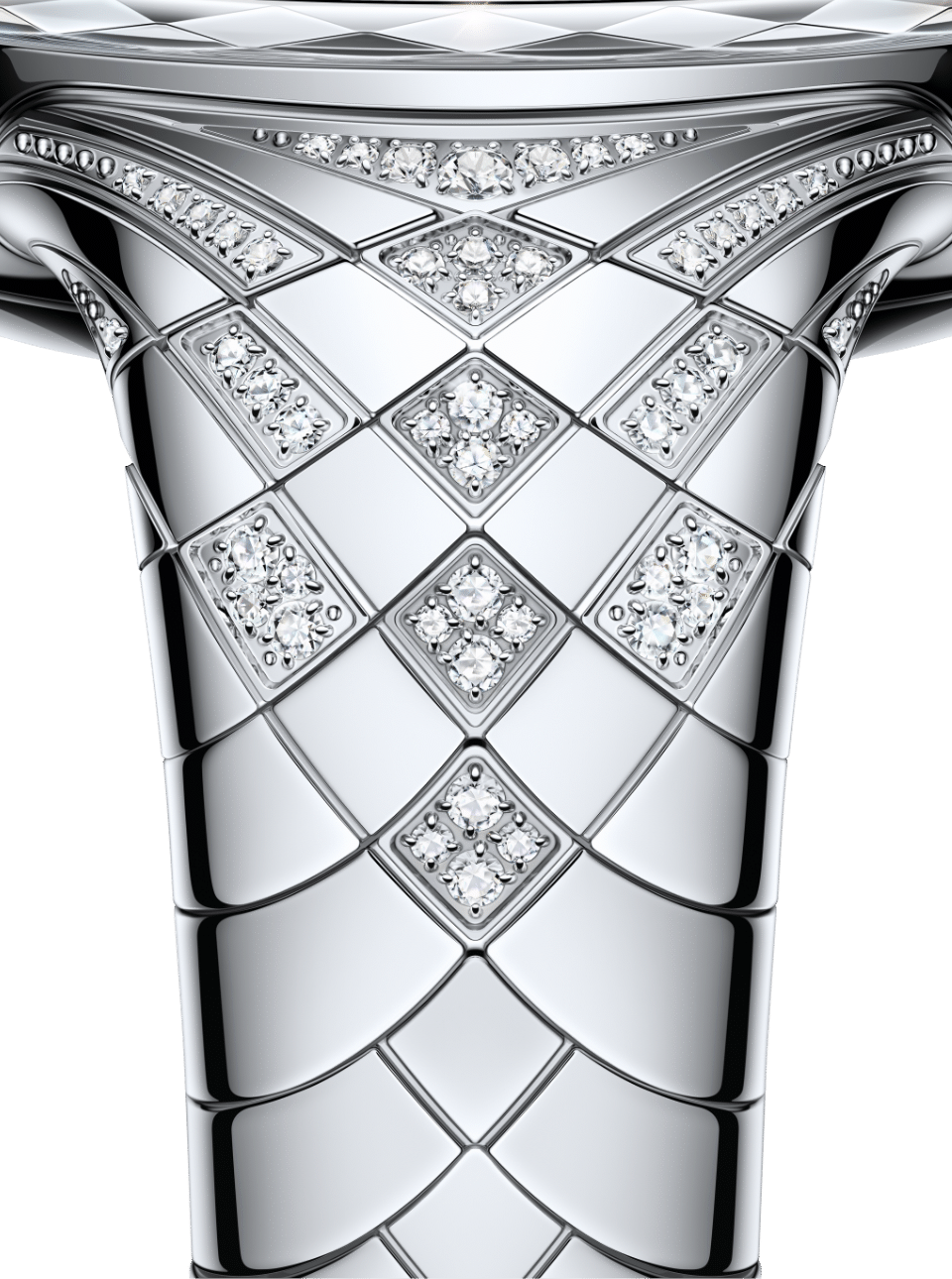
The vine's resilience captures a plant's enduring growth, designed with the Fibonacci golden ratio. A high-polish mirror finish glows with 99 hand-set natural diamonds along the strap and atop the crown—quiet strength, worn softly.

*Wrist circumference2: 130–175 mm

The overview of HUAWEI WATCH ULTIMATE DESIGN Spring Edition watch strap
The close-up of HUAWEI WATCH ULTIMATE DESIGN Spring Edition watch strap

Encounters
in Bloom

HUAWEI WATCH ULTIMATE DESIGN Spring Edition watch face scents of spring
  • HUAWEI WATCH ULTIMATE DESIGN Spring Edition watch face scents of spring
  • HUAWEI WATCH ULTIMATE DESIGN Spring Edition watch face monochrome
  • HUAWEI WATCH ULTIMATE DESIGN Spring Edition watch face universal law

Scents of Spring

Universal Law

Monochrome

Dynamic watch faces capture the essence of spring. Behind the dial, a jewel-like finish brings a precious, luminous quality to life.

Smart Health

Artistry
Meets Vitality

HUAWEI WATCH ULTIMATE DESIGN Spring Edition checks your body with X-TAP

Health Glance3

Press and hold the X-TAP sensor. In 60 seconds, three advanced sensors—ECG, PPG, and pressure—work together to produce a health report with 11 key metrics, from cardiovascular to respiratory health, detecting subtle shifts before your body even whispers.

HUAWEI WATCH ULTIMATE DESIGN Spring Edition tracks women's health

The Rhythm Within, Revealed

Reveal the patterns of your cycle by tracking your sleep, mood, heart rate and others.4 Together, they help form a complete picture.

HUAWEI WATCH ULTIMATE DESIGN Spring Edition helps you get in shape

Fuel Your Glow

Track your daily diet with ease.5 The watch analyses calorie intake and offers personalised insights—quiet guidance for a balanced approach to wellness.

HUAWEI WATCH ULTIMATE DESIGN Spring Edition senses your emotions

Where Emotions Bloom

Log how you feel in the Emotional Wellbeing app.6 Your emotions become subtle visual expressions—on a mood-based watch face. Balance off? Breathing exercises are always at your wrist.

Smart Experience

No Phone
No Problem

The picture of the user wearing HUAWEI WATCH ULTIMATE DESIGN Spring Edition shows its calling and payment functions
  • Cellular Calling

    Stay connected with eSIM independent communications.7 Make or answer calls with a simple lift of the wrist.

  • Pay from Your Wrist

    A quick raise of your wrist is all it takes to pay.8 Simple, smooth, and there when you need it.

  • Emergency SOS

    Your safety, always close at hand. Press the crown quickly 5 times—emergency call9 or SOS message10 with your location is sent automatically. No phone required.

  • Broad Compatibility

    Your watch works seamlessly with both iOS and Android™. Enjoy all the smart features, right on your wrist.11

HUAWEI WATCH ULTIMATE DESIGN Spring Edition supports over 100 workout modes

Train Your Way

Discover a world of possibilities with over 100 workout modes, including golf, Pilates, and jazz dance. Let your watch inspire your every move.

Stay in Charge

Switch to Battery Saver mode in three seconds to extend your battery life.12 Or stay in Standard mode for the full range of features.

Standard
mode

  • Up to

    days13

    in typical use

  • Up to

    days14

    with AOD on

Battery Saver
mode

  • Up to

    days15

    in light use

  • Up to

    days16

    in typical use

  • Up to

    days17

    with AOD on

The front view of HUAWEI WATCH ULTIMATE DESIGN Spring Edition shows its battery life

Premium Benefits

HUAWEI WATCH ULTIMATE DESIGN Spring Edition arrives in a soft green gift box, embossed with a delicate Fibonacci flower motif, a quiet nod to nature's own vitality and grace.

HUAWEI WATCH ULTIMATE DESIGN Spring Edition package
  1. The watch crystal is made of artificial sapphire glass.
  2. For a video tutorial on wrist circumference measurement, please visit: https://consumer.huawei.com/en/support/content/en-us16091291/. For a video tutorial on strap installation and removal, please visit: https://consumer.huawei.com/en/support/content/en-us16084628/.
  3. This product and Health Glance are not intended for medical use. The results are for reference only and should not be used as a basis for diagnosis or treatment. Some data in Health Glance reports comes from medical software and third-party health research projects and may not be applicable to every individual. Please read the user agreement and corresponding information carefully before using this feature. Additionally, certain features in the Health Glance report will only appear after they have been activated and valid data has been collected.
  4. This product is not intended for medical use. All data and results are for reference only and should not be used as a basis for diagnosis or treatment.
  5. This product is not a medical device. All monitoring data and results are for reference only and should not be used as a basis for medical diagnosis or treatment.
  6. Emotional state data is not available during sleep or exercise. This watch face feature is not available when your watch is connected to a phone running 32-bit Android.
  7. eSIM Cellular Calling uses either the eSIM One Number service or the Standalone Number service. For availability and charges, consult your local carrier. If your watch uses the One Number service, the eSIM mobile network will be disabled when the watch is paired with a phone. For more information, please visit: https://consumer.huawei.com/en/support/content/en-us15810288/.
  8. To add a bank card, open the HUAWEI Health app on your phone, go to Devices > Wallet, and link a bank card. You can then use NFC payment via the watch's Wallet as well as QR code payment. Please note that bank card payment is not supported on iOS devices.
  9. eSIM Cellular Calling uses either the eSIM One Number service or the Standalone Number service. For availability and charges, consult your local carrier. If your watch uses the One Number service, the eSIM mobile network will be disabled when the watch is paired with a phone. For more information, please visit: https://consumer.huawei.com/en/support/content/en-us15810288/. If you have not enabled the eSIM service, you will need to connect your watch to your phone to access the Internet.
  10. Sending and receiving messages independently requires the eSIM Standalone Number service. For availability and charges, consult your local carrier. For more information, please visit: https://consumer.huawei.com/en/support/content/en-us15810288/. If your watch uses the eSIM One Number service, or if eSIM is not yet activated, connect your watch to your phone (via Bluetooth) for Internet access. SOS messages cannot be sent when your watch is connected to an iPhone.
  11. Only available when paired with a phone running HarmonyOS 2/Android 9.0/iOS 13.0 or later and installed with the HUAWEI Health app. Actual feature availability may vary depending on the phone model and operating system.
  12. Data comes from Huawei labs. Actual usage may vary depending on product differences, usage habits, and environmental factors.
  13. The battery life with typical usage in Standard mode is tested under the following conditions: default settings, 2 hours of LTE connection and 22 hours of Bluetooth connection with a phone per day, heart rate monitoring always on, HUAWEI TruSleep™ enabled at night, 2 ECG measurements per day, 60 minutes of app usage per week, 30 minutes of Bluetooth calling per week, 30 minutes of Bluetooth music playback per week, 90 minutes of exercise on average per week, message notifications enabled (50 messages, 6 calls, and 3 alarms per day), and the device screen turned on 200 times per day.
  14. The battery life in Standard mode with AOD enabled is tested under the following conditions: default settings, AOD enabled, 2 hours of LTE connection and 22 hours of Bluetooth connection with a phone per day, heart rate monitoring always on, HUAWEI TruSleep™ enabled at night, 2 ECG measurements per day, 60 minutes of app usage per week, 30 minutes of Bluetooth calling per week, 30 minutes of Bluetooth music playback per week, 90 minutes of exercise on average per week, message notifications enabled (50 messages, 6 calls, and 3 alarms per day), and the device screen turned on 200 times per day.
  15. The battery life within light usage in Battery Saver mode is tested under the following conditions: default settings, Battery Saver mode enabled, 30 minutes of Bluetooth calling per week, 30 minutes of music playback per week, heart rate monitoring always on, HUAWEI TruSleep™ enabled at night, 90 minutes of exercise on average per week, message notifications enabled (50 messages, 6 calls, and 3 alarms per day), and the device screen turned on 200 times per day.
  16. The battery life with typical usage in Battery Saver mode is tested under the following conditions: default settings, Battery Saver mode enabled, 30 minutes of Bluetooth calling per week, 30 minutes of music playback per week, heart rate monitoring always on, HUAWEI TruSleep™ enabled at night, stress monitoring enabled, pulse wave arrhythmia analysis and sleep breathing awareness features enabled, 180 minutes of exercise on average per week, message notifications enabled (50 messages, 6 calls, and 3 alarms per day), and the device screen turned on for a total of 30 minutes per day.
  17. The battery life in Battery Saver mode with AOD enabled is tested under the following conditions: default settings, Battery Saver mode enabled, AOD enabled, 30 minutes of Bluetooth calling per week, 30 minutes of music playback per week, heart rate monitoring always on, HUAWEI TruSleep™ enabled at night, stress monitoring enabled, pulse wave arrhythmia analysis and sleep breathing awareness features enabled, 180 minutes of exercise on average per week, message notifications enabled (50 messages, 6 calls, and 3 alarms per day), and the device screen turned on for a total of 30 minutes per day.
  18. Every diamond in this watch is ethically sourced from certified suppliers under the Kimberley Process.
  19. The diamond-set lugs, crown, and strap of this product are not covered under warranty for routine aesthetic wear or damage caused by improper use.
Leaving consumer.huawei.com
After clicking the link, you will enter a third-party website. Huawei is not responsible and has no control over this third party website.
Continue Return